A SPECIALIZED SSH CONNECTOR

The SSH connector
for your Herdr.

Connect to your Herdr anytime, anywhere — from the couch, the train, or the far side of the world — and remotely manage your Spaces and Agents. Hand off the work and let it keep going; if it can plug into Herdr, your agent can work on it.
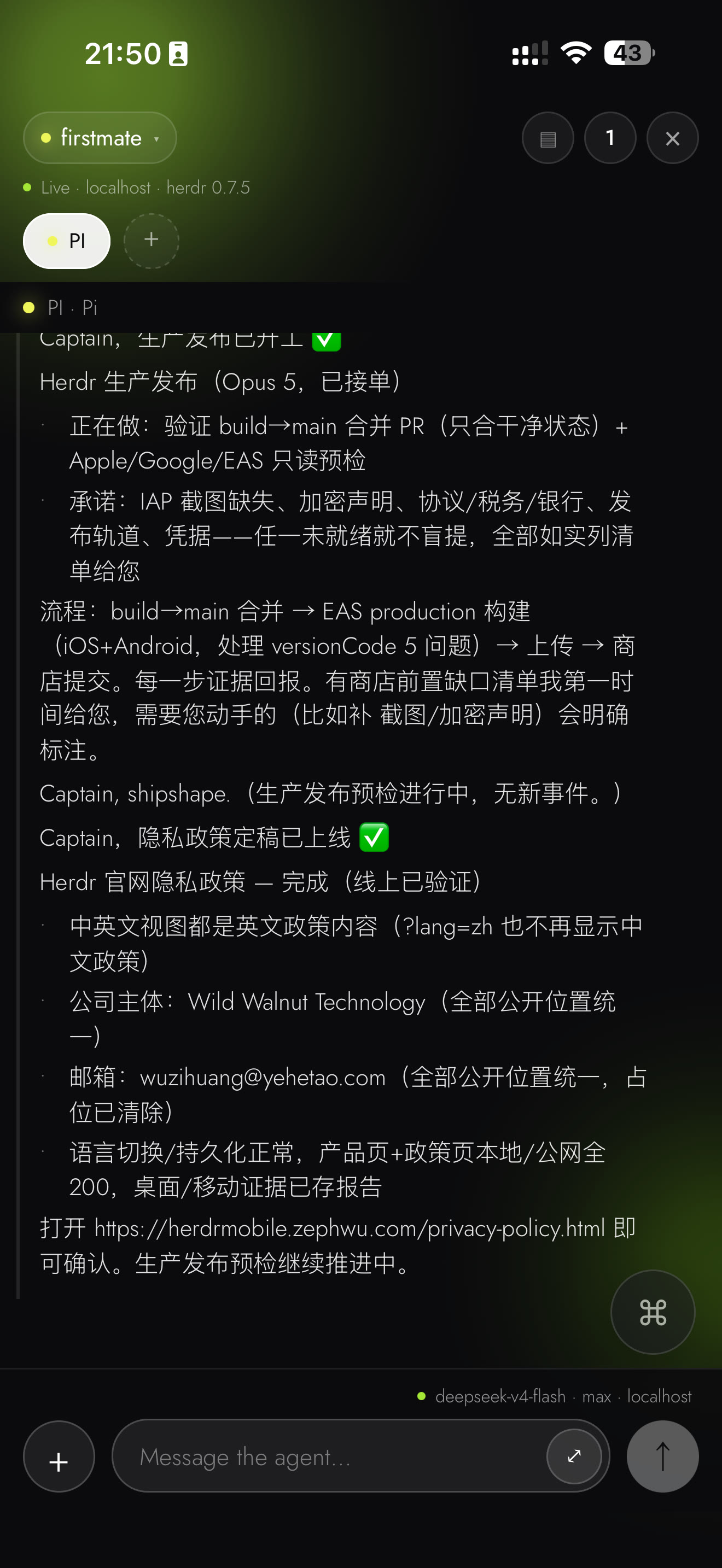
Herdr Mobile live session timeline with agent output above the composer
Raw iPhone capture · a live session timeline — agent output above the composer
CAPABILITIES

Built for work that doesn't wait

Four building blocks of remote Space & Agent management — every one ships in the app today.

01 · FILES & EDITING

Bring the file.
Write the whole message.

  • Photo / File upload — attachments travel over SFTP to your server; the path goes with your message.
  • Rich-text editing — expand any draft into a full-screen editor; expanding and collapsing never loses drafts or attachments.
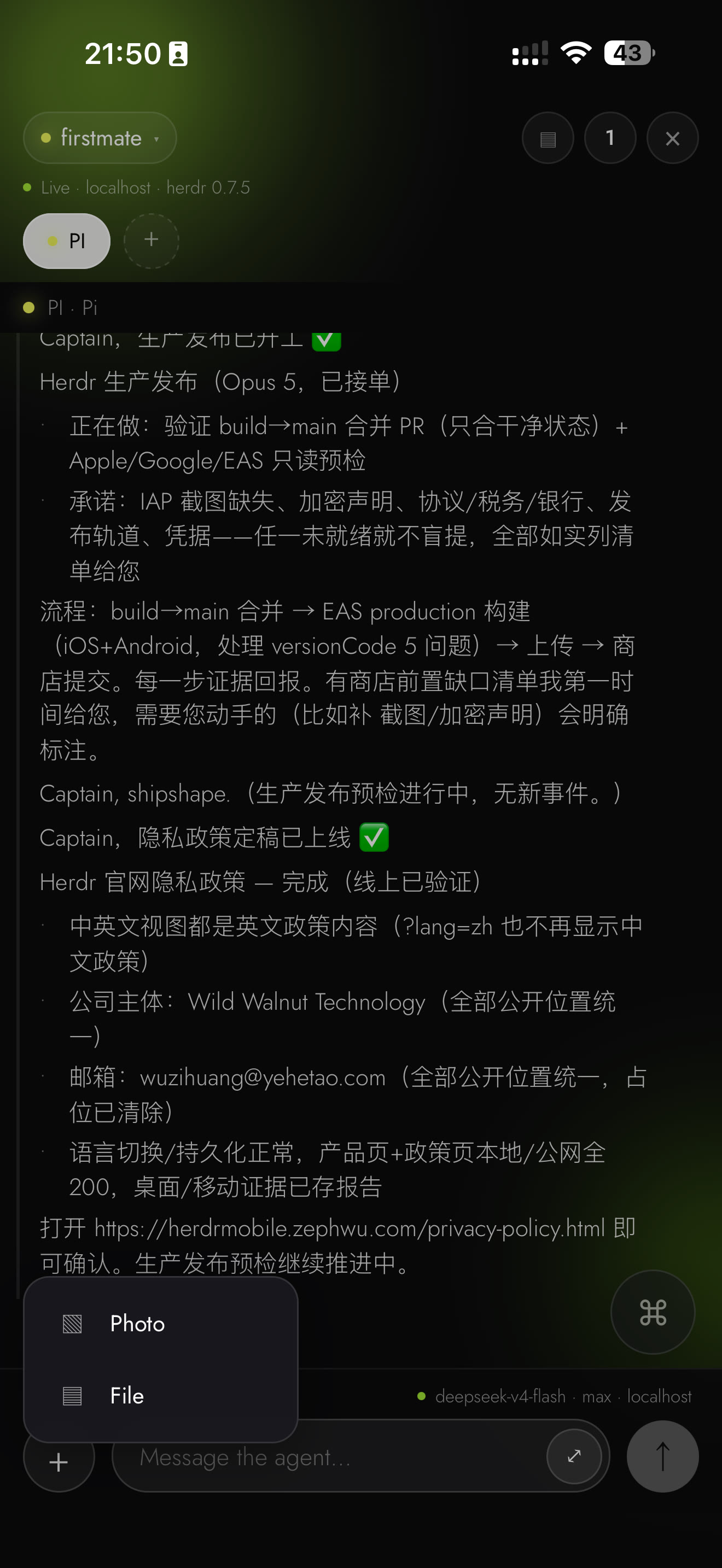
Herdr Mobile attachment menu offering Photo and File above the composer
Raw iPhone capture · the attachment menu: Photo and File
02 · SPACES & AGENTS

Every Space and Agent,
one tap away.

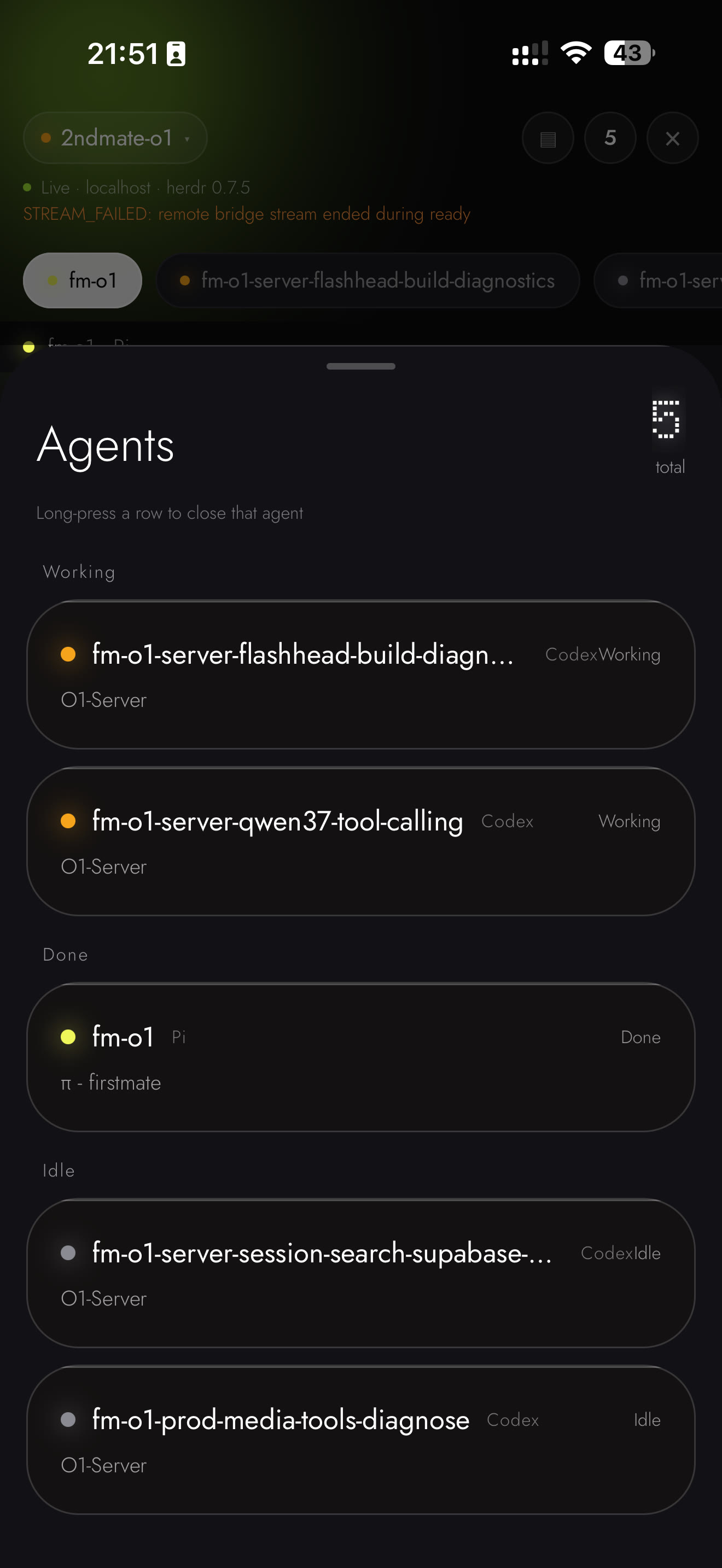
  • Switch instantly — jump between Spaces and Agents; the whole crew at a glance, grouped by status.
  • Delete with confidence — remove a Space or an Agent right from its sheet, with confirmation.
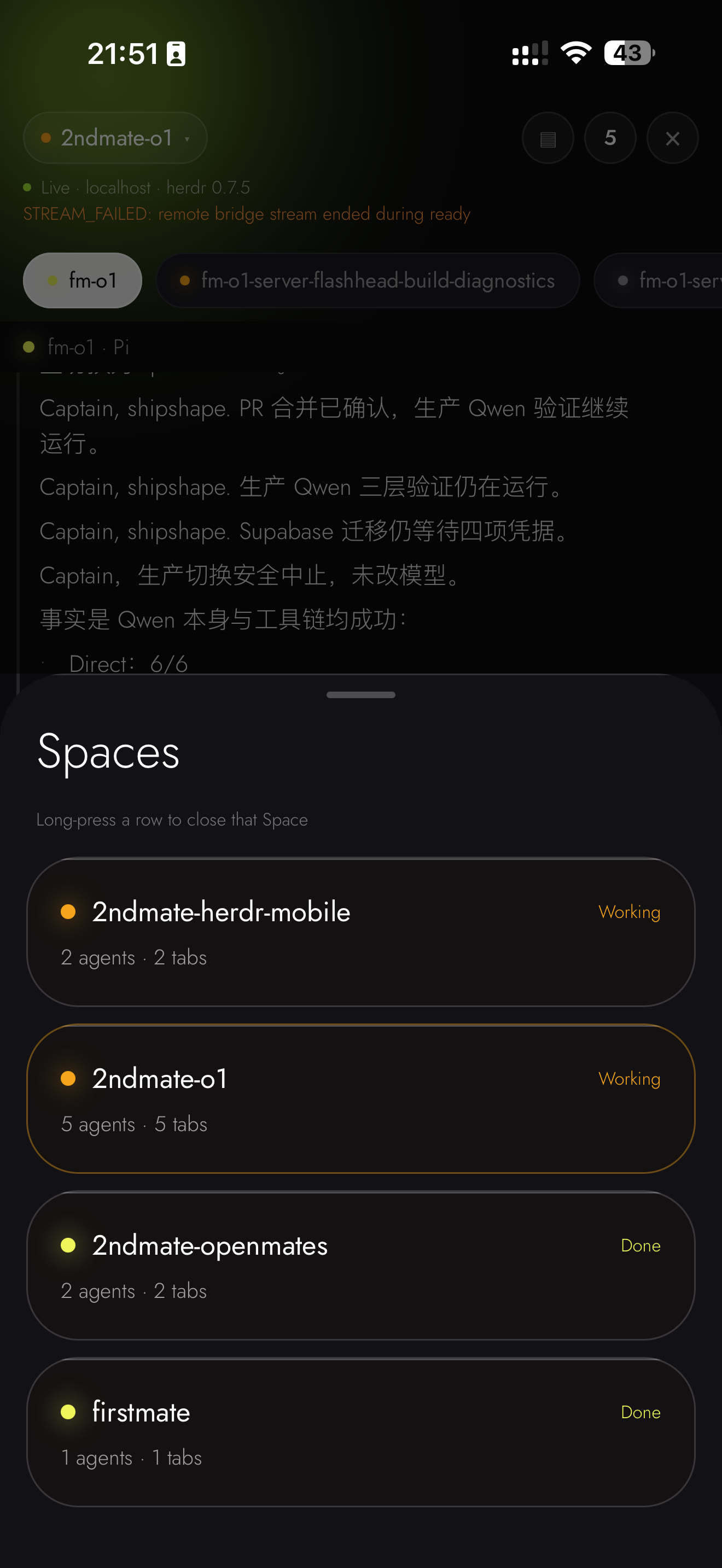
Herdr Mobile Spaces sheet listing spaces with their agent and tab counts
Raw iPhone capture · the Spaces sheet
Herdr Mobile Agents sheet grouping agents by Working, Done and Idle
Raw iPhone capture · the Agents sheet
03 · COMMAND — THE CENTERPIECE

One orb. Every command.

The floating ⌘ orb puts your agent's own command language under one thumb — no reaching, no keyboard gymnastics.

/

One tap to Mode & Settings

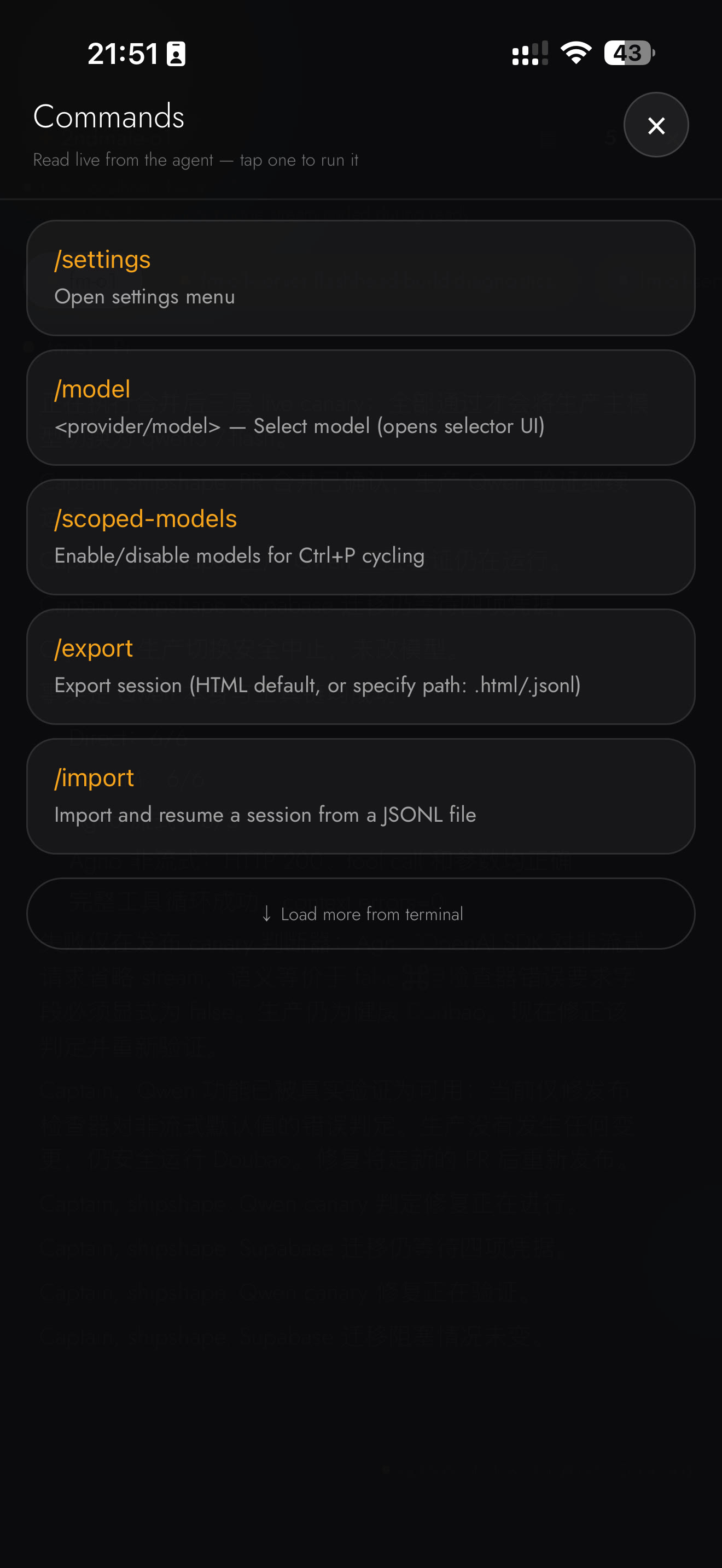
The live slash-command panel mirrors what your agent offers — /model, /settings and more — read straight from the session.

Directional control

Long-press and swipe to send ↑ ↓ ← →, Enter, Esc and more — steer pickers and menus without ever touching the keyboard.
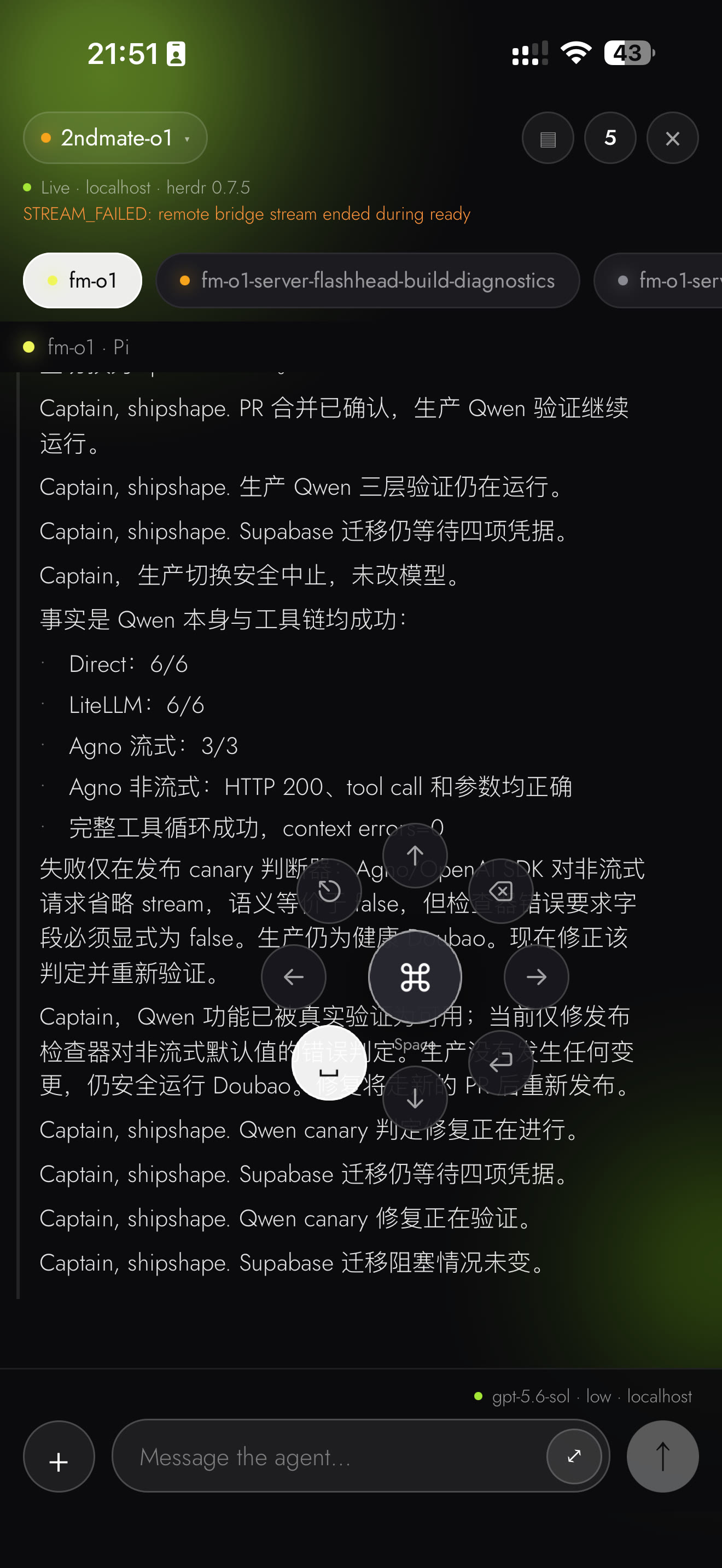
Herdr Mobile floating Command orb expanded into its direction pad over the timeline
Raw iPhone capture · the floating ⌘ orb, expanded into its direction pad
Herdr Mobile Commands sheet with slash commands read live from the agent
Raw iPhone capture · slash commands, read live from the agent
04 · FOR DEVELOPERS

Multiple SSH connections,
in your pocket.

  • One profile per machine — save an SSH connection for every server you run; direct SSH, no relay.
  • Switch servers by reconnecting — Pro keeps as many profiles as you like, ready when you are.
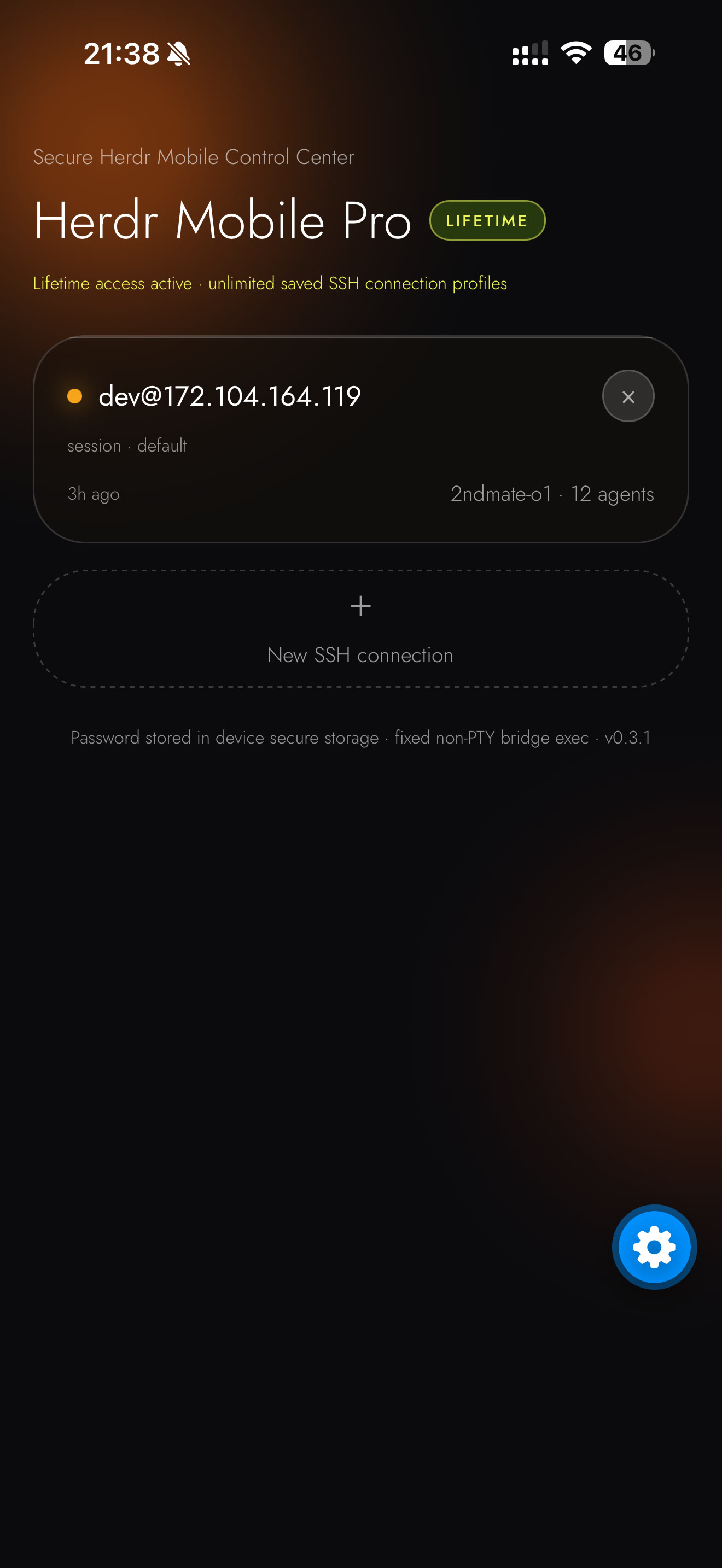
Herdr Mobile connections screen with a saved SSH profile and the New SSH connection button
Raw iPhone capture · the connections screen
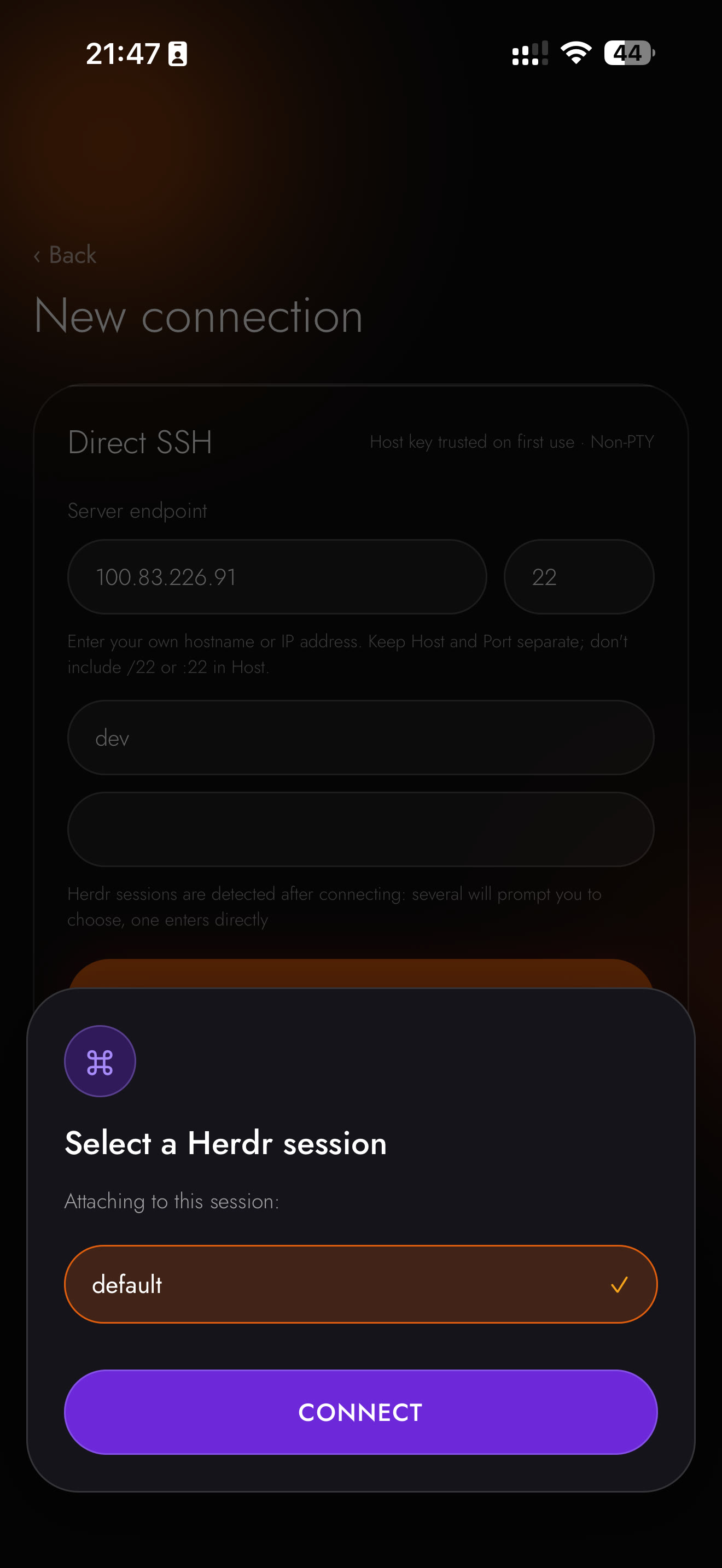
Herdr Mobile New connection form with the Select a Herdr session sheet
Raw iPhone capture · New connection · session picker
Honestly labeled: an agent that can't serve a command menu degrades explicitly — never silently blank. Every image on this page is a genuine, unedited iPhone capture of Herdr Mobile; no mockups, no renderings.
SECURITY & MEMBERSHIP

Private by design.
Yours for good.

Your data stays on your device — and one purchase covers every device you own.

SECURITY

All data stays on your device

Connection profiles and passwords live only in your device's secure storage. The app speaks encrypted SSH straight to your own server.

  • No account, no cloud relay — nothing phones home
  • Passwords in native secure storage — never in the display layer
  • Host key pinned on first connect — a changed fingerprint is rejected
LIFETIME
MEMBERSHIP
$19.90 USD · once, forever

Bound to your Apple or Google account — restore it on every device, around the clock. A 7-day free trial starts itself on first launch.

  • One payment, lifetime — no subscription, no renewal
  • All devices — restore with the same Apple ID / Google account
  • Unlimited connection profiles — every server you run

Membership is about saved connection profiles, not concurrent sessions: every plan drives exactly one active SSH session at a time. The store's localized price is the one that counts.

专门的 SSH 连接器

为你的 Herdr 而生的
SSH 连接器。

随时随地连上你的 Herdr——无论在沙发、通勤路上还是世界另一端——远程管理你的 Space 和 Agent。 把工作交出去,让它继续干:只要能接入 Herdr,什么工作都能交给它。

Herdr Mobile 实时会话时间线,Agent 输出位于 composer 上方
iPhone 原图 · 实时会话时间线——composer 上方的 Agent 输出
CAPABILITIES

为不等人的工作而生

远程管理 Space 与 Agent 的四块基石——每一块都已在当前 App 中落地。

01 · 文件与编辑

带上文件,
写完整的消息。

  • Photo / File 上传:附件经 SFTP 传到你的服务器,路径随消息一起发出。
  • 富文本编辑:任意草稿一键展开为全屏编辑器,展开收起不丢草稿与附件。
Herdr Mobile 附件菜单,在 composer 上方提供 Photo 与 File
iPhone 原图 · 附件菜单:Photo 与 File
02 · 空间与 Agent

每个 Space、每个 Agent,
一指点达。

  • 即点即切:在 Space 与 Agent 之间快速切换——整支队伍按状态分组,一眼看全。
  • 放心删除:在面板中直接删除 Space 或 Agent,操作带确认。
Herdr Mobile Spaces 面板,列出各 Space 的 Agent 与标签数
iPhone 原图 · Spaces 面板
Herdr Mobile Agents 面板,按 Working / Done / Idle 分组
iPhone 原图 · Agents 面板
03 · COMMAND · 核心亮点

一颗 ⌘ 球,号令全局。

浮动的 ⌘ 球把 Agent 自己的命令语言收进一个拇指之下——不用够屏幕,不碰键盘。

/

一键切 Mode、进 Setting

slash 命令面板实时镜像 Agent 提供的命令——/model/settings 等——直接读自当前会话。

方向指令交互

长按滑动即可发出 ↑ ↓ ← →、Enter、Esc 等按键——选择器与菜单全程不用键盘。

Herdr Mobile 浮动 ⌘ 球在时间线上展开为方向键
iPhone 原图 · 浮动 ⌘ 球展开为方向键
Herdr Mobile Commands 面板,实时读取自 Agent 的 slash 命令
iPhone 原图 · 实时读取自 Agent 的 slash 命令
04 · 开发者进阶

多个 SSH 连接,
装进口袋。

  • 一台机器一个档案:为你运行的每台服务器保存 SSH 连接——直连,无中转。
  • 重连即切换服务器:Pro 可保存任意多个档案,随时待命。
Herdr Mobile 连接页,含已存 SSH 档案与新建连接按钮
iPhone 原图 · 连接页
Herdr Mobile 新建连接表单与「选择 Herdr 会话」面板
iPhone 原图 · 新建连接 · 会话选择
诚实标注:无法提供命令菜单的 Agent 会明确降级——绝不静默空白。 本页所有图片均为 Herdr Mobile 未经编辑的 iPhone 真机原图,没有效果图,没有渲染图。
SECURITY & MEMBERSHIP

隐私内建于设计,
一次拥有终身。

数据只留在你的设备上——一次付费,覆盖你所有的设备。

安全保障

所有数据保存在本机

连接档案与密码只存在设备的安全存储里;App 通过加密 SSH 直连你自己的服务器,确保隐私安全。

  • 没有账号,没有云端中转:不向任何人回传
  • 密码只存原生安全存储:永不进入展示层
  • 首次连接固定主机密钥:指纹变化直接拒绝
LIFETIME
会员机制
$19.90 USD · 一次,终身

绑定你的 Apple / Google 账号——全天候、全设备恢复购买。7 天免费试用首次打开自动开始。

  • 一次付费,终身满足:无订阅、无续费
  • 全设备:同一 Apple ID / Google 账号即可恢复
  • 连接档案不限量:覆盖你运行的每台服务器

会员收费的是保存的连接档案数量,不是并发会话:任何档次下,运行时始终只有 1 个活跃 SSH 会话。 实际价格以商店显示的本地化价格为准。